
Has this ever happened to you? You want to send a file to someone, so you write a nice e-mail explaining what it is; then you click the send button, and some minutes later you receive the reply: “ok, very nice, but … where’s the attached file?”.
Yes, you forgot to attach the file. It’s a common but hard to avoid problem; a good rule is always attach the file before writing the e-mail, but aren’t there any better ways to avoid this?
Some systems, like GMail or Thunderbird, have options to alert you when you try to send an e-mail which includes specific words (“file”, “enclose”, “photo”, …) but has no attached files. It’s a nice idea, but far from perfect: you will still miss files if the system doesn’t detect these words, or you will get an annoying alert about an attachment you don’t want to send.
A simple solution
Here’s a simpler solution: the user gets notified of how many attachments the e-mail has when he/she is about to send the e-mail, not using annoying alerts but simply including that information in the send button, like this (GMail example):
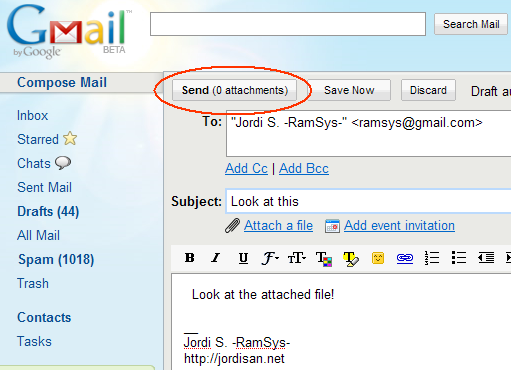
So when you are going to send the e-mail, you realize that the message has no attachments. Simple and effective, don’t you think so?