Ir al contenido / Skip navigation
Menú
¡Lo último!
Últimos artículos
Comentarios recientes
<ul><li>Saladashed.-: <a href="http://jordisan.net/blog/2006/que-es-un-framework#comment-11484" title="Saladashed.-">QUE GENIAL, la verdad que este post vale oro, está explicado sencilla y claramente, sin caer en la simplicidad. Oja...</a> <small> </small></li> <li>mike: <a href="http://jordisan.net/blog/2008/consejos-access#comment-11447" title="mike">las key las puedes nombrar como datos unicos y para generar reportes o kardex como lo que tu quieres hacer te recomie...</a> <small> </small></li> <li>TorvusBog: <a href="http://jordisan.net/blog/2008/un-badge-javascript-mejor-para-twitter#comment-11393" title="TorvusBog">excelente, me funcionó de inmediato, gracias! http://blog.felipebarrientos.cl</a> <small> </small></li> <li>Julio: <a href="http://jordisan.net/blog/2006/que-es-un-framework#comment-11236" title="Julio">Y yo que pensaba que un framework era solamente un conjunto de librerías...Gracias por sacarme de la ignorancia...</a> <small> </small></li> <li>Paula Alvarez: <a href="http://jordisan.net/blog/2006/proyecto-fin-de-carrera-analisis-de-logs-web#comment-11226" title="Paula Alvarez">Felicitaciones...Muy interesante</a> <small> </small></li> <li>JJTR: <a href="http://jordisan.net/blog/2006/que-es-un-framework#comment-11191" title="JJTR">Sprng es un frame work y como empiezo ha usar Spring</a> <small> </small></li> <li>Twitter Trackbacks for La mejor tira de Dilbert sobre usabilidad -@- jordisan.net [jordisan.net] on Topsy.com: <a href="http://jordisan.net/blog/2009/la-mejor-tira-de-dilbert-sobre-usabilidad#comment-11013" title="Twitter Trackbacks for La mejor tira de Dilbert sobre usabilidad -@- jordisan.net [jordisan.net] on Topsy.com">[...] Topsy Retweet Button var topsy_style = &quot;small&quot;; var topsy_order = &quot;count,retweet,badge&quot...</a> <small> </small></li> <li>jose: <a href="http://jordisan.net/blog/2006/consultando-el-diccionario-de-la-rae#comment-10944" title="jose">no me gusta nada es una putaa mierda</a> <small> </small></li> <li>José: <a href="http://jordisan.net/blog/2010/asi-son-los-correos-que-recibo#comment-10927" title="José">Hola amigo, mira, estamos realizando un concurso-sorteo para bloggers para presentar nuestra nueva tienda, el concurs...</a> <small> </small></li> <li>Victor Moral: <a href="http://jordisan.net/blog/2010/asi-son-los-correos-que-recibo#comment-10807" title="Victor Moral">Ciertamente sí, me pasa lo mismo. El caso de los avisos legales no tiene mucho remedio a menos que emplees filtros m...</a> <small> </small></li> </ul>
Clasificación de artículos
Wordpress: single posts using different language

Wordpress: single posts using different language

Lunes, 4 Agosto 2008

A technique to include single Wordpress posts in a different language than the main language of the blog.

Publishing a multilingual blog is a hard task; you have to translate and maintain every single post, besides translating all the interface. But what about if you have a simple monolingual blog, and occasionally want to include a post using a different language? You can just write the title and the content in that language, but, as W3C guidelines says, additionally you should…

Clearly identify changes in the natural language of a document's text and any text equivalents (e.g., captions). [Priority 1]

So here you are an easy way to mark a single post using a different language, using custom fields in Wordpress:

1. Modify your template file(s) (tipically single.php, index.php, archive.php) where the following piece of code appears (the div block containing every single post):


<div class="post" id="post-<?php the_ID(); ?>">

Modify them by adding the highlighted code (to check if there's a custom field called lang for that single post and include it as the language of the post, if not empty):


<div class="post" id="post-<?php the_ID(); ?>"<?php $custom = get_post_custom_values('lang'); if ( $custom != '' ) echo ' lang="'. $custom[0] . '"'; ?>>

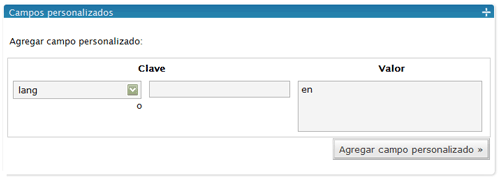
2. For every single post written in a different language than the blog main language, add a custom field called lang and assign it the post's language code ('en' for English; 'es' for Spanish, …)

Adding custom field 'lang' with value 'en'

3. And that's all. Now, every post may be identified with its own language. Of course, you don't need to include that field if the language of the article is the same language than the blog, as long as the main language is identified in the header of the web page.

Please, let me know it this works for you or if you find any bugs or improvements.

Deje un comentario