
Ir al contenido / Skip navigation
Menú
¡Lo último!
Últimos artículos
Comentarios recientes
<ul><li>Saladashed.-: <a href="http://jordisan.net/blog/2006/que-es-un-framework#comment-11484" title="Saladashed.-">QUE GENIAL, la verdad que este post vale oro, está explicado sencilla y claramente, sin caer en la simplicidad. Oja...</a> <small> </small></li> <li>mike: <a href="http://jordisan.net/blog/2008/consejos-access#comment-11447" title="mike">las key las puedes nombrar como datos unicos y para generar reportes o kardex como lo que tu quieres hacer te recomie...</a> <small> </small></li> <li>TorvusBog: <a href="http://jordisan.net/blog/2008/un-badge-javascript-mejor-para-twitter#comment-11393" title="TorvusBog">excelente, me funcionó de inmediato, gracias! http://blog.felipebarrientos.cl</a> <small> </small></li> <li>Julio: <a href="http://jordisan.net/blog/2006/que-es-un-framework#comment-11236" title="Julio">Y yo que pensaba que un framework era solamente un conjunto de librerías...Gracias por sacarme de la ignorancia...</a> <small> </small></li> <li>Paula Alvarez: <a href="http://jordisan.net/blog/2006/proyecto-fin-de-carrera-analisis-de-logs-web#comment-11226" title="Paula Alvarez">Felicitaciones...Muy interesante</a> <small> </small></li> <li>JJTR: <a href="http://jordisan.net/blog/2006/que-es-un-framework#comment-11191" title="JJTR">Sprng es un frame work y como empiezo ha usar Spring</a> <small> </small></li> <li>Twitter Trackbacks for La mejor tira de Dilbert sobre usabilidad -@- jordisan.net [jordisan.net] on Topsy.com: <a href="http://jordisan.net/blog/2009/la-mejor-tira-de-dilbert-sobre-usabilidad#comment-11013" title="Twitter Trackbacks for La mejor tira de Dilbert sobre usabilidad -@- jordisan.net [jordisan.net] on Topsy.com">[...] Topsy Retweet Button var topsy_style = &quot;small&quot;; var topsy_order = &quot;count,retweet,badge&quot...</a> <small> </small></li> <li>jose: <a href="http://jordisan.net/blog/2006/consultando-el-diccionario-de-la-rae#comment-10944" title="jose">no me gusta nada es una putaa mierda</a> <small> </small></li> <li>José: <a href="http://jordisan.net/blog/2010/asi-son-los-correos-que-recibo#comment-10927" title="José">Hola amigo, mira, estamos realizando un concurso-sorteo para bloggers para presentar nuestra nueva tienda, el concurs...</a> <small> </small></li> <li>Victor Moral: <a href="http://jordisan.net/blog/2010/asi-son-los-correos-que-recibo#comment-10807" title="Victor Moral">Ciertamente sí, me pasa lo mismo. El caso de los avisos legales no tiene mucho remedio a menos que emplees filtros m...</a> <small> </small></li> </ul>
Clasificación de artículos
A (better) Javascript badge for Twitter

A (better) Javascript badge for Twitter

Jueves, 28 Agosto 2008

Here you are a HTML/Javascript badge for showing your Twitter updates. Much better than the one at Twitter's web page!

So you want to show your latests Twitter updates in your web page? You can use Twitter's badge, but the look isn't great, and URLs neither @replies inside updates are not clickable.

If you want a better badge including clickable URLs and @replies (like the one at the left column of this page), just follow these steps:
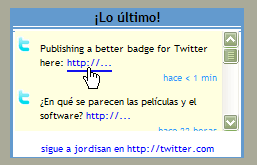
Badge for Twitter


1. Download and link to .js and .css files

Download twitter.css and twitter.js from my site. Put them on your own server, and modify your HTML page/template so as to link to them; you have to include something similar to this inside the <head> section:

<link rel="stylesheet" type="text/css" media="screen" href="twitter.css" />
<script type="text/javascript" src="twitter.js" /> 

You can modify the css file to get the appearance you want. You can also modify some strings in the .js file (for instance to adapt them to your language).

2. Include the code to insert the badge

Modify your HTML page/template inserting this code where you want the badge to appear:

<div id="twitter_div"><ul id="twitter_update_list"><li>loading…</li></ul>
</div>
<div>
<a class="twitter_follow" href="http://twitter.com/YOUR_USERNAME">follow me at http://twitter.com</a>
</div>

Don't forget including your own Twitter username. You can also modify the 'loading…' or the 'follow me' strings.

3.Include the call to the Twitter API

Include this code at the end of your template/HTML file, just before </body> tag (this way you ensure your page will still display correctly if the call fails, for instance, if Twitter's site is down):

<script type="text/javascript" src="http://twitter.com/statuses/user_timeline/YOUR_USERNAME.json?callback=twitterCallback2&count=10"></script>

Don't forget including your own Twitter username. You can also modify the number of updates to show. 

And that's all

Please tell me if you are using this badge, or you find any error or upgrade.

Deje un comentario